


 GPS & GNSS
 Lidar scanning
 Total Station
GNSS
AR Vision Stake-Out: How Augmented Reality Makes GNSS Stakeout Easier in the Field
AR vision stake-out is changing the way surveyors and construction professionals find points in the field. Instead of only following arrows, numbers and distance values on a controller screen, the operator can see visual guidance over a live camera view of the real site.
For many users, this makes stakeout more intuitive. The software can show where the design point, line, road feature, utility route or layout position is located in relation to the ground in front of them. This helps the operator walk toward the correct location faster and with more confidence.
AR vision stake-out does not replace good surveying practice, correct coordinate systems or reliable RTK positioning. It is a visual guidance tool that works together with GNSS, RTK corrections, IMU tilt compensation, field software and design data.
Quick answer: what is AR vision stake-out?
AR vision stake-out is a GNSS stakeout method that uses augmented reality to show stakeout guidance on top of a live camera image. The user sees the real field environment on the controller or receiver screen, while the software displays virtual markers, arrows, points, lines or design information in the correct direction.
In practical terms, AR vision stake-out helps the operator answer a simple question: where do I need to walk, and where is the point in the real world?
This is especially useful when working with many points, complex layouts, road designs, utility networks, building corners, kerb lines, trenches, slopes or construction features that are difficult to understand from a 2D map alone.
How does AR vision stake-out work?
AR vision stake-out combines several technologies that are already common in modern survey equipment. The GNSS receiver calculates the position of the pole or receiver. RTK corrections improve the position accuracy. The camera provides a live view of the site. The field software combines this information with design data and displays visual guidance on the screen.
Depending on the equipment and software, the camera may be built into the GNSS receiver, built into the field controller, or used as part of a vision-enabled receiver system. The exact workflow depends on the receiver, controller, software and manufacturer.
| Component | Role in AR vision stake-out |
|---|---|
| GNSS receiver | Calculates the field position using satellite signals. |
| RTK corrections | Improve the GNSS position for survey-grade stakeout work. |
| Camera | Shows a live view of the real site environment. |
| IMU tilt compensation | Helps measure or navigate while the pole is tilted, depending on the receiver capability. |
| Field software | Loads points, lines, CAD data or design files and displays AR guidance. |
| Coordinate system setup | Ensures the design data and field measurements use the correct reference system. |
What does the operator see on the screen?
In a traditional GNSS stakeout workflow, the operator usually follows a map view, compass, arrows, northing/easting offsets and distance-to-point values. This works well for experienced surveyors, but it can be slower for new users or for crews working on complex sites.
With AR vision stake-out, the screen can show the point location in relation to the live camera image. The operator may see a target marker, direction arrow, line, distance value or visual overlay that guides them toward the correct position.
The main advantage is not that the GNSS receiver becomes more accurate simply because AR is used. The advantage is that the operator can understand the direction and location faster. AR helps translate coordinate-based stakeout information into a real-world visual guide.
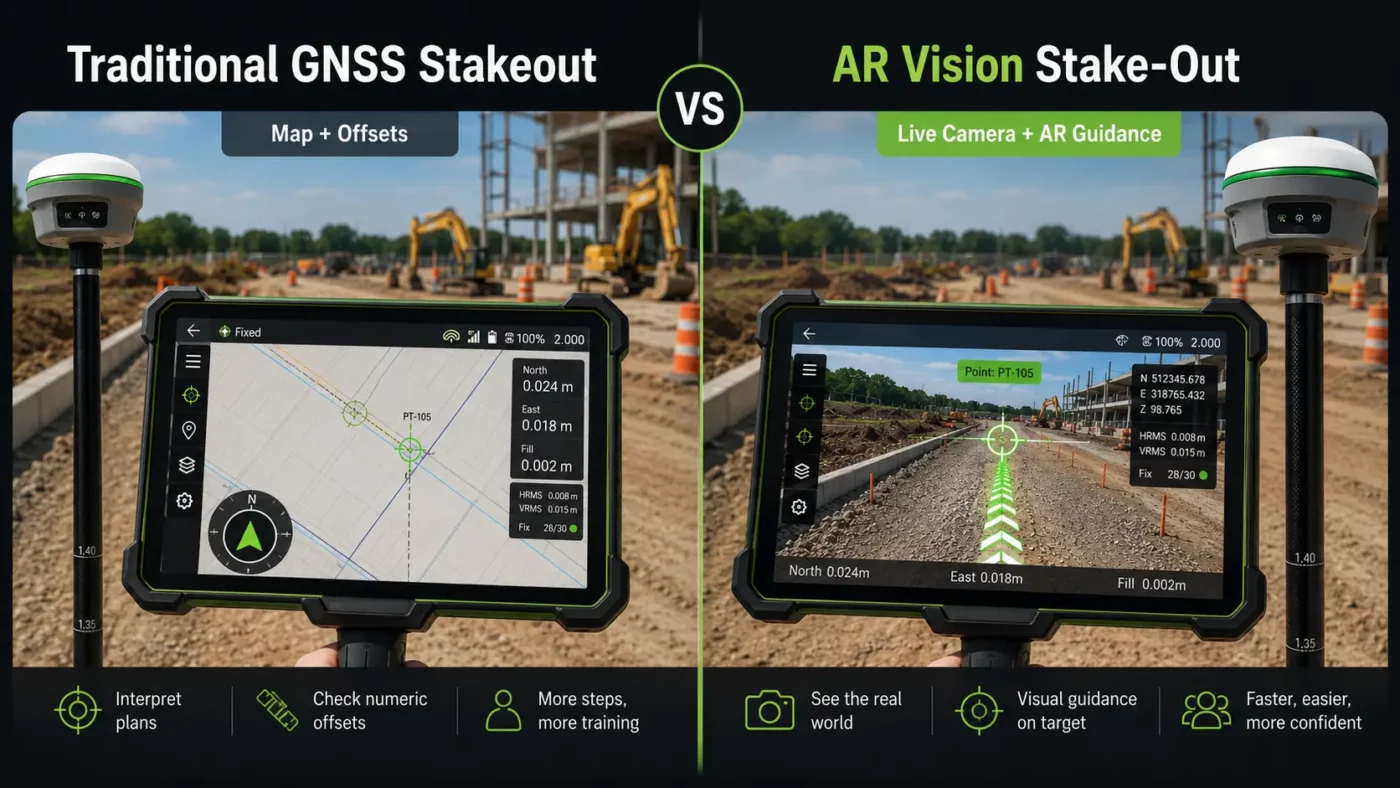
Why AR vision stake-out matters in surveying and construction
Stakeout is one of the most important field tasks in surveying and construction. Crews use stakeout to transfer digital design information from drawings, CAD files or coordinate lists onto the physical site. If stakeout is slow or confusing, layout work can delay excavation, concrete work, road construction, utility installation or machine-control preparation.
AR vision stake-out helps reduce the gap between office design data and the real construction site. Instead of interpreting only a plan view, the operator can see the approximate location of the design point in the actual field environment.
This can be valuable when the site contains many similar features, when the point is not obvious from the map, or when the operator needs to navigate around obstacles such as fences, stockpiles, trenches, traffic, vegetation or machinery.
Typical AR vision stake-out workflow
The exact workflow depends on the equipment and software, but most AR vision stake-out jobs follow a similar process.
- Prepare or import the design data, such as points, lines, DXF files, road data or project coordinates.
- Check that the correct coordinate system, geoid model and project settings are selected.
- Connect the GNSS receiver to RTK corrections from a base station, radio link or NTRIP network.
- Open the stakeout function in the field software.
- Select the point, line or design feature to stake out.
- Use the normal map, compass or offset view to navigate close to the target area.
- Switch to the AR or vision stakeout view when visual guidance is useful.
- Follow the on-screen marker or direction guide until the pole tip reaches the required position.
- Check the final offsets, position quality and tolerances before marking the point.
- Store the as-staked point or report data if required for documentation.

Where is AR vision stake-out most useful?
AR vision stake-out is most useful when visual context makes the field task easier. It can help experienced surveyors work faster, but it is also helpful for construction crews and layout teams who may not work with coordinate systems every day.
Construction layout
On construction sites, AR vision stake-out can help crews find building corners, grid points, anchor bolt positions, foundations, kerb lines, drainage features and utility routes. The visual overlay makes it easier to understand where the design point sits in relation to existing site features.
Road and infrastructure projects
Road layouts often include many points, alignments, offsets and design elements. AR guidance can help the user move toward the correct chainage, offset or feature more intuitively, especially when the site is busy or the 2D map view is crowded.
Utility and trench work
For utilities, pipelines, cables and drainage, AR vision stake-out can help crews follow a planned route in the field. It is especially useful when a line crosses open ground or when there are few visible reference features.
Urban and congested sites
On urban sites, the operator may need to work around walls, kerbs, parked vehicles, traffic, fences or existing structures. AR visual guidance can make it easier to identify the target direction without constantly switching between the screen and the site.
Training and mixed-experience crews
New users often find visual guidance easier than interpreting coordinate offsets alone. AR vision stake-out can help less experienced operators understand where to move, while still allowing supervisors to check accuracy, quality and project settings.
AR vision stake-out compared with traditional GNSS stakeout
| Feature | Traditional GNSS stakeout | AR vision stake-out |
|---|---|---|
| Navigation style | Map, arrows, compass and offset values. | Live camera view with visual markers or overlays. |
| Ease of understanding | Very effective, but may require more field experience. | Often easier for users who prefer visual guidance. |
| Best use | General stakeout, open areas, experienced survey workflows. | Complex sites, dense layouts, construction crews and visual navigation. |
| Accuracy source | GNSS, RTK corrections and project setup. | GNSS, RTK corrections and project setup. AR mainly improves visual guidance. |
| Limitations | Can be harder to interpret in busy or confusing environments. | Depends on camera view, software support, calibration and field conditions. |
Does AR vision stake-out improve accuracy?
AR vision stake-out mainly improves guidance and usability. The final survey accuracy still depends on the GNSS receiver, RTK correction quality, satellite conditions, multipath, pole setup, IMU performance, calibration, coordinate system settings and the quality of the design data.
This is an important point for buyers. AR can make it easier to find the point, but it does not remove the need to check the final offset values, RTK status and measurement quality. A visually clear marker on the screen is only useful when the underlying positioning and project setup are correct.
For professional stakeout, the operator should still check whether the receiver has a fixed RTK solution, whether the coordinate system is correct, and whether the required tolerance has been reached before marking the point.
What should you check before using AR vision stake-out?
Before relying on AR vision stake-out on a project, it is important to check the complete system, not only the AR function. The receiver, controller, software, corrections and design files all need to work together.
- Software support: Check whether your field software supports AR stakeout, visual stakeout or camera-based stakeout.
- Camera setup: Check whether the camera is built into the receiver, the controller or another supported device.
- Design file compatibility: Confirm whether the software can import the required points, DXF, DWG, LandXML, road data or other project files.
- Coordinate system: Make sure the project coordinate system, geoid and units are correct.
- RTK correction method: Confirm whether you will use NTRIP, a local base station, UHF radio or another correction source.
- Field visibility: Bright sunlight, rain, dust, camera angle and screen brightness can affect how easy the AR view is to use.
- Training: Operators should understand that AR is a guidance aid, not a replacement for survey checks.
Limitations of AR vision stake-out
AR vision stake-out is useful, but it is not perfect in every field situation. The camera view can be affected by lighting, weather, obstacles or screen visibility. In some cases, a traditional map or numeric offset view may still be faster.
AR overlays also depend on correct position and orientation information. If the receiver heading, tilt compensation, camera alignment or project setup is not correct, the visual guidance may not match the real field position as expected.
Another limitation is compatibility. Not every GNSS receiver, controller or software package supports AR vision stake-out. Some systems require specific receiver models, dual cameras, updated firmware, a compatible controller or a particular field software license. Always check the actual product specifications before buying.
AR vision stake-out and IMU tilt compensation
Many modern GNSS receivers combine AR vision features with IMU tilt compensation. These are related but different technologies.
IMU tilt compensation helps the user measure or stake points without keeping the pole perfectly vertical, depending on the receiver and software capability. This can be useful near walls, fences, trenches, slopes, traffic, stockpiles or other hard-to-reach locations.
AR vision stake-out helps the user visually navigate to the target. Together, these features can make fieldwork more efficient. AR helps the user find the location, while IMU tilt compensation can help with practical pole positioning when the site is awkward. However, both functions must be supported and correctly configured on the equipment being used.
Who should consider AR vision stake-out?
AR vision stake-out is worth considering for surveyors, construction layout teams, civil contractors, GIS teams and infrastructure crews who regularly stake out points, lines or design features in the field.
It is especially useful for teams that want a more visual workflow, crews that work on complex construction sites, or businesses that need to train new field operators more efficiently. It may also help companies reduce confusion between office design files and real site conditions.
For very simple stakeout work in open fields, traditional GNSS stakeout may already be enough. For busy sites, dense point layouts or mixed-experience crews, AR vision stake-out can provide a clearer and more intuitive workflow.
Related Global GPS Systems product categories
Global GPS Systems supplies surveying and construction equipment for GNSS, RTK, total station, drone mapping, LiDAR and machine-control workflows. For AR vision stake-out, the most relevant categories are RTK GNSS receivers, GNSS rover sets, field controllers, surveying software and RTK correction solutions.
When comparing systems, check the full workflow. A receiver may support accurate RTK positioning, but AR vision stake-out also depends on camera hardware, software support, controller compatibility and the type of design data you need to use.
AR Vision Stake-Out FAQ
AR Vision Stake-Out Basics
What is AR vision stake-out in GNSS surveying?
AR vision stake-out is a GNSS stakeout workflow that uses augmented reality to show visual guidance over a live camera view of the field. Instead of only following arrows, maps and offset values, the operator can see virtual markers, points, lines or direction guides in relation to the real site environment.
How does AR vision stake-out work?
AR vision stake-out combines GNSS positioning, RTK corrections, camera input, field software and project design data. The GNSS receiver calculates the position, the RTK correction improves accuracy, and the software displays stakeout guidance over the live camera image.
What does the operator see during AR stakeout?
The operator may see a live camera view with a target marker, direction arrow, line, distance value or design overlay. This helps the user understand where the point or feature is located in the real world and how to move toward it.
Is AR vision stake-out the same as traditional GNSS stakeout?
No. Traditional GNSS stakeout normally uses a map view, compass, arrows and numeric offset values. AR vision stake-out adds a camera-based visual layer that makes the target position easier to understand on complex or busy sites.
Does AR vision stake-out make GNSS more accurate?
AR vision stake-out mainly improves visual guidance and usability. Final accuracy still depends on the GNSS receiver, RTK correction quality, satellite conditions, coordinate system setup, pole position, IMU performance and measurement checks.
Equipment, Software and Data
What equipment do I need for AR vision stake-out?
You need a compatible GNSS receiver, camera hardware, a field controller or receiver display, field software that supports AR or visual stakeout, and a reliable RTK correction source. Exact requirements depend on the receiver, controller, software and manufacturer.
Do I need RTK corrections for AR vision stake-out?
For professional surveying and construction stakeout, RTK corrections are normally required. RTK corrections can come from an NTRIP network, local base station, radio link or another supported correction source.
Does the camera need to be built into the GNSS receiver?
Not always. Depending on the system, the camera may be built into the GNSS receiver, built into the controller, or used as part of a vision-enabled receiver setup. Always check the specific product and software compatibility before choosing a system.
Can AR vision stake-out work with CAD files?
Many AR stakeout workflows can use imported points, lines and design files. File compatibility depends on the field software, so check whether the software supports the formats you use, such as DXF, DWG, LandXML or coordinate files.
Why is the coordinate system important for AR stakeout?
The coordinate system connects the digital design data to the real field position. If the coordinate system, geoid model, units or project settings are incorrect, the AR guidance and final stakeout position may not match the intended design location.
Can AR stakeout be used with IMU tilt compensation?
Yes, many modern GNSS systems combine AR vision features with IMU tilt compensation. AR helps the operator visually navigate to the target, while IMU tilt compensation can help when measuring or staking points with a tilted pole, depending on receiver capability.
Field Applications and Users
Who uses AR vision stake-out?
AR vision stake-out is used by land surveyors, construction layout teams, civil contractors, road and infrastructure crews, utility teams, GIS teams and field operators who need clearer visual guidance when staking out points, lines or design features.
Is AR vision stake-out useful for construction layout?
Yes. It can help with building corners, grid points, anchor bolt positions, foundations, kerb lines, drainage features, utility routes and other construction elements that need to be transferred from design data to the physical site.
Can AR stakeout help on road and infrastructure projects?
Yes. Road and infrastructure projects often involve many points, alignments, offsets and design features. AR visual guidance can make it easier to navigate toward the correct chainage, offset, line or layout position.
Is AR vision stake-out useful for utility and trench work?
Yes. AR vision stake-out can help crews follow planned routes for utilities, pipelines, cables, drainage and trenches, especially where there are few visible reference points in the field.
Does AR stakeout help on urban or congested sites?
Yes. On sites with walls, kerbs, fences, vehicles, traffic, trenches, machinery or existing structures, AR visual guidance can make it easier to understand the target direction without relying only on a 2D map view.
Is AR vision stake-out suitable for beginners?
AR guidance can be easier for new users to understand because it shows the target in relation to the real environment. However, operators still need training in RTK status, coordinate systems, tolerances, field software and survey quality checks.
Accuracy, Checks and Limitations
What should I check before marking a stakeout point?
Before marking a point, check the RTK status, coordinate system, project settings, offset values, pole position, IMU status if used, measurement quality and required project tolerance. AR guidance should support the workflow, not replace final survey checks.
What are the main limitations of AR vision stake-out?
The main limitations include camera visibility, screen brightness, weather, dust, obstacles, software compatibility, calibration, GNSS conditions and project setup. In some situations, a traditional map or numeric offset view may still be faster.
Can poor GNSS conditions affect AR stakeout?
Yes. AR vision stake-out depends on the underlying GNSS position. Poor satellite visibility, multipath, weak RTK corrections or incorrect setup can affect the reliability of the displayed guidance and final stakeout result.
Does AR vision stake-out replace surveying experience?
No. AR vision stake-out makes navigation more visual and intuitive, but operators still need to understand surveying principles, coordinate systems, correction sources, tolerances and quality control procedures.
Can AR vision stake-out reduce field mistakes?
AR vision stake-out can help reduce confusion by showing the target location in the real field environment. This can be especially useful on complex layouts, dense point files and mixed-experience crews, but final checks are still required.
When is AR vision stake-out most useful?
AR vision stake-out is most useful on complex construction sites, road projects, utility routes, dense layouts, urban sites and projects where visual context helps the operator understand where to move and where the design feature belongs.
Should I choose a GNSS receiver with AR vision stake-out?
A GNSS receiver with AR vision stake-out is worth considering if you regularly perform construction layout, road stakeout, utility staking or complex point navigation. For simple open-field work, traditional GNSS stakeout may already be sufficient.
 GPS & GNSS
 Total Stations
 Data collectors
 Software
 Correction services
 Machine control
 External radio
 Marine
 Accessories