
 GPS & GNSS
 Lidar scanning
 Total Station
EFIX eOffice GNSS Post Processing Software
This product is Available
Contact our experts for the best possible price and configuration.
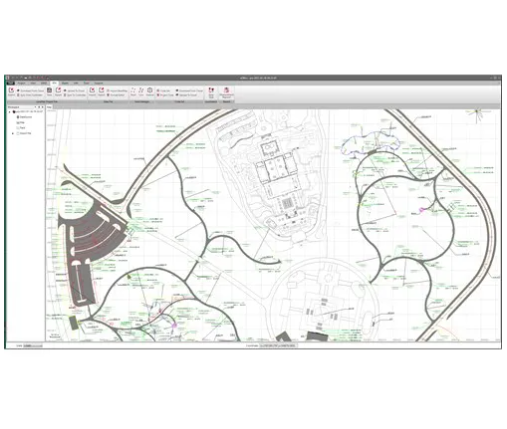
EFIX eOffice is GNSS post-processing software for turning raw field data into accurate, usable survey results in the office. It is built for surveyors, geodetic professionals, UAV mapping teams, construction engineers and road project teams who need to process static, PPK, RTK, Road and UAV data in one workflow.
The software helps bridge field collection and office processing, with tools for GNSS observations, coordinate conversion, project visualisation, quality checking and reporting. For teams working with EFIX GNSS equipment or mixed field data, eOffice provides a practical way to review, correct and prepare positioning results before delivery.
EFIX eOffice Highlights
| Software type | GNSS post-processing and field data office software |
|---|---|
| Processing modes | Static, PPK, PPP and RTK workflows |
| Main modules | GNSS, RTK, Road and UAV modules |
| GNSS data support | GPS, GLONASS, BeiDou and Galileo raw data processing |
| Office tools | Coordinate converter, observation data manager, map tools and calculation utilities |
| Operating system | Microsoft Windows 7 or higher with .NET Framework 4.0 |


Valued customers:










Find RTK Networks
Search NTRIP providers and connect to reliable RTK correction services.
Description
EFIX eOffice GNSS Post Processing Software
EFIX eOffice is office software for processing and analysing raw GNSS field data after a survey. It is designed for professionals who collect GNSS observations in the field and need a structured way to process, check, correct and export positioning results back in the office.
For surveyors, engineers, drone pilots and GIS teams, eOffice helps reduce the gap between field collection and final deliverables. Instead of relying only on real-time results, users can process static and PPK data afterwards, review observation quality, manage coordinate systems and prepare corrected positions for survey, mapping, construction or road design work.
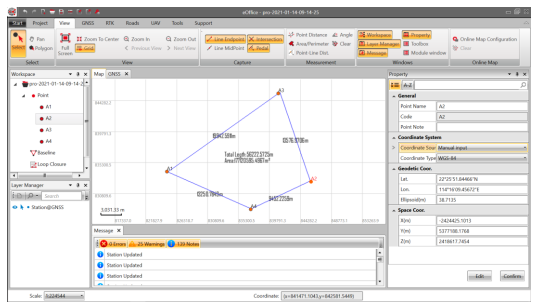
Built for Surveying, UAV Mapping and Construction Workflows
EFIX eOffice is especially useful for projects where accurate GNSS positions are important but field conditions are not always perfect. Surveyors can use it for static GNSS baselines and control work. UAV teams can process flight trajectory data and ground control point workflows. Construction and infrastructure teams can use the Road module to handle alignment-related data and prepare information for road projects.
The software combines GNSS, RTK, Road and UAV tools in one platform. This makes it suitable for companies that carry out different types of fieldwork with the same team, such as boundary surveys, topographic surveys, drone mapping, construction layout checks and road corridor projects.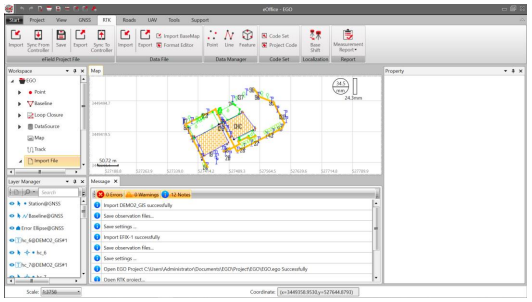
Post Process Raw GNSS Data with Practical Quality Control
In real fieldwork, GNSS data quality can be affected by satellite geometry, multipath, obstructions, base station setup and observation time. eOffice gives users tools to import GNSS data, process baselines, review results and check the quality of the solution before using the coordinates in a final drawing, report or GIS database.
Static and PPK processing are useful when centimetre-level results are needed after the field session, or when real-time correction was unavailable, unstable or not suitable for the project. This is valuable for survey control, drone mapping control points, repeatable measurement work and engineering projects where a clean office workflow is required.
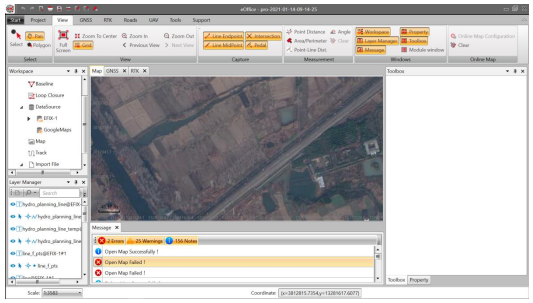
Useful Tools for Everyday Office Processing
EFIX eOffice is more than a simple GNSS processor. It includes office tools that help users prepare and manage project data, including coordinate conversion, GNSS observation data management, map display, file handling and calculation utilities. These tools help reduce the need to move between several small applications during a normal survey processing workflow.
The map and visualisation functions make it easier to inspect points, lines, features and project layers. This is helpful when checking whether field data is complete, whether points are in the expected location and whether processed results are ready for export or further use in CAD, GIS or construction software.
Road and UAV Support for Specialist Projects
For road construction and infrastructure work, eOffice includes road-related functionality for handling road elements and alignment data. This supports workflows where GNSS measurements are part of road design, road stakeout preparation or quality checks along a corridor.
For drone mapping and UAV survey work, eOffice supports UAV-related processing workflows. This can help drone teams process GNSS trajectory data and prepare accurate positioning information for photogrammetry, mapping and ground control applications.
Who Uses EFIX eOffice?
EFIX eOffice is intended for professionals who work with GNSS data and need office-based control over their results. Typical users include land surveyors processing static observations, construction teams checking field measurements, UAV pilots preparing mapping projects, geodetic users working with control networks and GIS teams that need reliable coordinates before importing field data into their systems.
It is also a practical choice for companies that already use EFIX GNSS receivers and want a dedicated office environment for processing, checking and managing field data. Global GPS Systems can help buyers understand whether eOffice fits their existing GNSS workflow, field equipment and project requirements.
Why Buy EFIX eOffice from Global GPS Systems?
GNSS post-processing software is most valuable when it fits the way your team actually works. Global GPS Systems supplies GNSS equipment, software and support to surveyors, construction professionals, drone pilots and GIS users worldwide. Our team can help you match eOffice with your receiver setup, correction workflow and project type, so you can process field data with more confidence in the office.
EFIX eOffice is a strong option for users who need a focused GNSS office platform for static, PPK, RTK, Road and UAV workflows without making the process unnecessarily complex. It gives field teams a practical way to turn raw GNSS measurements into checked, usable positioning results for professional survey and mapping projects.
Datasheets & Manuals
Datasheets and manuals
Specifications
EFIX eOffice Specifications
Product Overview
| Product Name | EFIX eOffice |
|---|---|
| Product Type | GNSS post-processing software |
| Software Purpose | Office software for processing, analyzing, correcting and managing GNSS field survey data |
| Primary Applications | Geodetic surveying, land surveying, UAV trajectography, ground control points (GCPs), road construction and GNSS data post-processing |
| Platform Description | Fully integrated data hub linking field survey workflows with GNSS post-processing requirements |
| Manufacturer | EFIX Geomatics Co., Ltd. |
Core Processing Capabilities
| GNSS Processing Modes | Static, PPK and PPP processing |
|---|---|
| RTK Data Support | Supports RTK project workflows, field coordinate correction and controller data synchronization |
| PPK Processing | Supports PPK post-processing results for correcting field coordinates |
| PPP Processing | Includes PPP processing and reporting functions |
| Baseline Processing | Includes baseline configuration, processing, checking and repeated single-baseline processing |
| Adjustment | Includes preparation for adjustment, adjustment processing and adjustment reporting |
| Quality Control | Includes quality checking configuration, checking and quality checking reports |
| Supported GNSS Data Types | Static and dynamic GNSS raw data |
| Supported Satellite Systems | GPS, GLONASS, BeiDou and Galileo |
| Observation File Handling | Supports multiple observation file formats, file merging, RINEX conversion and GNSS observation file splitting/merging |
| CORS Data | Supports download of CORS reference GNSS data |
Integrated Modules
| GNSS Module | Import, configuration, duplicate station detection, recalculation, baseline processing, adjustment, data graphs, quality checking, file conversion, file merging, PPP and reports |
|---|---|
| RTK Module | eField project file import, controller synchronization, data file import/export, base map import, file formatting, coordinate systems, data manager, coordinate data, stakeout points, lines, features, PPK, code sets, localization and reports |
| Road Module | Road file creation/import/merge/save, road elements, control points, station equation, horizontal alignment, vertical alignment, standard section, widening, super elevation, structures, slope sections and road calculation results |
| UAV Module | UAV data import, RINEX conversion, processing, data graph, UAV view, information and reports |
| Tools Module | Coordinate system tools, coordinate converter, GNSS utilities, GIS/COGO tools, download utilities, triangulation, earthwork and grid tools |
| Support Module | Help, user manual, release notes, work process, about, license and feedback functions |
Project and Workflow Management
| Project Creation | Create new projects with configurable name, directory and template |
|---|---|
| Default Template | Default template applies WGS 84 coordinate system |
| Template Saving | Save current project properties as a template file (.CGT) |
| Project Properties | Basic information, coordinate system, unit/format and precision settings |
| Project Export | Export current project coordinate system file (.CRD) as a .ZIP file |
| Recent Projects | Displays ten recent projects with corresponding save directories |
| Controller Synchronization | Supports synchronization between PC and Android controller devices |
| Interface Layout | Includes title bar, quick tool bar, menu bar, workspace, layer manager, map, property window, toolbox, message window and status bar |
| Customizable Workflow | User interface layout and modules can be customized to suit preferred working habits |
| Built-in Documentation | Includes built-in electronic user manual |
Coordinate System and Geodetic Functions
| Coordinate System Management | View, select and modify coordinate system information |
|---|---|
| Ellipsoid Parameters | Model, name, semi-major axis and flattening |
| Projection Parameters | Projection method, central meridian, origin latitude, scale factor, false easting, false northing, average latitude and projection height |
| Datum Transformation Methods | None parameters, 3 parameters, 7 parameters, strict 7 parameters and grid transformation |
| Supported Datum Grid Files | CGD, GRD and BYN |
| Plane Calibration Methods | None parameters, 4 parameters and best practice parameters |
| Elevation Fitting Methods | None parameters, fixed difference parameters, surface fitting parameters, curve surface fitting parameters and best practice parameters |
| Supported Geoid File Types | CGD, GGF, GRD, BYN, GSF, BIN, GDF, JASC and OSGB |
| Plane Grid Support | Plane horizontal east grid and plane horizontal north grid |
| Supported Plane Grid Formats | CGD, GRD, PXY, OSGB and DAT |
| Site Calibration | Localization between WGS-84 and local coordinate systems |
| Coordinate Converter | Included in geodetic utilities toolset |
| Coordinate System Manager | Included in tools module |
Units, Formats and Precision
| Coordinate Units | Meter, international feet and U.S. feet |
|---|---|
| Distance Units | Meter, international feet and U.S. feet |
| Angle Formats | Degrees/minutes/seconds, degree and radian |
| Latitude/Longitude Formats | Degrees/minutes/seconds, degree and radian |
| Precision Settings | Configurable precision for coordinate, height, distance and angle values |
Data Visualization and Map Functions
| Map Window | Displays current project data and offline/online maps |
|---|---|
| Layer Manager | Displays imported data layers and related layer operations |
| Online Map | Includes online map configuration and selectable online map functionality |
| View Tools | Full screen, zoom to center, zoom in, zoom out, grid, previous view and next view |
| Capture Tools | Line endpoint, intersection, line midpoint and pedal capture |
| Data Graphs | Observation file, baseline list, station list, control point list, loop closure list, residual observation data figure and observation file timeline figure |
| GIS Engine | Embedded GIS-related tools for project visualization and geodetic workflows |
Measurement, Calculation and Utility Tools
| Measurement Tools | Point distance, angle, area/perimeter and point-line distance |
|---|---|
| COGO Tools | Angle conversion, equal angle, deflection angle, eccentric point, intersection point, dividing line and coordinate inverse |
| Road Calculation Tools | Spiral curve calculator, retrograde curve decomposition, oval curve calculation, batch calculation and cross section merge |
| Geodetic Utility Tools | Coordinate converter, RINEX converter, TIFF map compressor, angle calculator, distance calculator, volume calculator, antenna manager and observation file splitter/merger |
| GNSS Utility Tools | Antenna manager, ephemeris forecast, ionosphere prediction and HCN file viewer |
| Download Tools | RAW files from FTP and GNSS file downloader |
| Surface and Volume Tools | Triangulation, earthwork and grid tools |
| TIFF Map Compressor | Supports TIFF map compression using SIT workflow |
Reports and Output
| Baseline Reports | Supported |
|---|---|
| PPK Data Calculation Summary | Supported |
| Loop Closure Reports | Supported |
| Adjustment Reports | Supported |
| Quality Checking Reports | Supported |
| RTK Reports | Supported |
| UAV Reports | Supported |
| Other Reports | Supported |
File and Data Handling
| RINEX Conversion | Supported for GNSS and UAV workflows |
|---|---|
| File Merging | Supported |
| Observation File Manager | Supported |
| File Formatter | Supported in RTK data file workflows |
| Base Map Import | Supported |
| Data Export | Supports project, coordinate system and RTK data export functions |
| Data Import | Supports GNSS, RTK, road, UAV and base map data import functions |
Software License and Languages
| License Method | USB dongle driver and software registration code |
|---|---|
| Supported Language | English, Russian and Chinese |
| Administrator Privileges | Required under Microsoft Windows |
System Requirements
| Component | Minimum | Recommended |
|---|---|---|
| Operating System | Microsoft Windows 7 and above with .NET Framework 4.0 | Microsoft Windows 7, 8 or 10, 32-bit or 64-bit |
| Processor | Intel Core i3 | Intel Core i5 |
| RAM | 4 GB | 8 GB |
| Free Disk Space | At least 10 GB | At least 10 GB |
| Hard Disk | 1 GB | 1 TB |
| Graphics | DirectX 9 compatible integrated graphics | DirectX 9 compatible 2 GB discrete graphics |
| Runtime Library | .NET Framework 4.0 / VS2008 / VS2012 / VS2015 runtime | .NET Framework 4.0 / VS2008 / VS2012 / VS2015 runtime |
Package / Included Items
| Item | Quantity | Notes |
|---|---|---|
| EFIX eOffice Software | 1 | GNSS post-processing software package |
| Software License | 1 | License may be provided by USB dongle driver and/or software registration code depending on configuration |
| User Manual | 1 | Electronic user manual available for installation, configuration and operation guidance |
Specifications and package contents may vary by configuration, region or manufacturer update. Always check the current configuration before ordering.
FAQ
EFIX eOffice FAQ
Product Overview
What is EFIX eOffice?
EFIX eOffice is GNSS office software for post-processing and analyzing raw satellite positioning data. It is designed to help surveying, geodetic, UAV and construction professionals process field data into accurate positioning results.
What is eOffice used for?
eOffice is used for GNSS post-processing, static data processing, PPK workflows, PPP processing, RTK data management, UAV trajectory processing, road project data, coordinate conversion, quality checking and survey reporting.
Who is eOffice designed for?
eOffice is designed for land surveyors, geodetic engineers, UAV mapping teams, construction surveyors, road engineers, GIS technicians and professionals who need to process and validate GNSS survey data in the office.
Is eOffice a field software or office software?
eOffice is office software. It is used after fieldwork to process, analyze, adjust, check and export GNSS, RTK, PPK, UAV and road project data.
Can eOffice connect field survey work with office processing?
Yes. eOffice is designed as a link between field survey data and office-based GNSS post-processing. It can import field data, manage project information, process observations and export results for further use.
GNSS Processing and Accuracy Workflows
Which GNSS data can eOffice process?
eOffice can process raw GNSS data from major satellite systems such as GPS, GLONASS and BeiDou. It is built for professional positioning workflows that require accurate post-processing and data validation.
Does eOffice support static GNSS processing?
Yes. eOffice supports static GNSS processing, making it suitable for geodetic control, reference points, control networks and other survey workflows where high-accuracy post-processed positions are required.
Does eOffice support PPK processing?
Yes. eOffice supports PPK, or Post-Processed Kinematic, workflows. This is useful for UAV mapping, mobile GNSS surveys and projects where field data needs to be corrected and processed after collection.
Does eOffice support PPP processing?
Yes. eOffice includes PPP, or Precise Point Positioning, functionality. PPP can be useful when a workflow requires precise GNSS positioning without relying on a local base station in the same way as traditional relative processing.
Can eOffice process RTK data?
Yes. eOffice includes RTK data workflows, including eField project file import, controller synchronization, data file import and export, coordinate system management, data management and localization tools.
Can eOffice convert GNSS files to RINEX?
Yes. eOffice includes RINEX conversion tools, allowing users to convert GNSS observation data into a standard exchange format for processing, checking or use in compatible GNSS workflows.
Does eOffice include quality checking?
Yes. eOffice includes quality checking tools and reports. These help users review GNSS processing results, identify issues and validate data before using results in professional survey deliverables.
Survey, UAV and Road Applications
Is eOffice suitable for land surveying?
Yes. eOffice is suitable for land surveying workflows that require GNSS data import, baseline processing, adjustment, coordinate management, quality checking, reporting and export of accurate survey results.
Can eOffice be used for UAV mapping?
Yes. eOffice includes a UAV module for processing UAV-related GNSS data. It can support workflows such as UAV trajectory processing, RINEX conversion, UAV data graphs and UAV processing reports.
Can eOffice be used for ground control points?
Yes. eOffice is suitable for ground control point workflows. Survey teams can use it to process GNSS observations, check results and prepare accurate control data for mapping, UAV and construction projects.
Can eOffice be used for road construction projects?
Yes. eOffice includes road functionality for road project workflows. It can handle road elements, alignments, cross sections, widening data, calculation results and road-related tools for engineering and construction applications.
Does eOffice support road alignment data?
Yes. eOffice includes tools for road control points, station equations, horizontal alignment, vertical alignment, standard sections, widening, super elevation, structures and related road calculation workflows.
Can eOffice sync with a field controller?
Yes. eOffice includes controller synchronization functions, allowing users to sync project data from a controller and export or sync processed data back to supported field workflows.
Tools, Visualization and System Requirements
Does eOffice include map and GIS visualization?
Yes. eOffice includes online map functionality and an embedded GIS engine. Users can display project data, layers, features, drawings and road data in a visual map-based environment.
What utility tools are included in eOffice?
eOffice includes a range of professional tools such as coordinate system management, coordinate conversion, GNSS observation data management, antenna management, ephemeris forecast, ionosphere prediction, COGO tools, and angle, distance, area and volume calculations.
Can eOffice generate reports?
Yes. eOffice can generate reports for GNSS processing workflows, including baseline reports, PPK data calculation summaries, loop closure reports, adjustment reports and quality checking reports.
What are the recommended computer requirements for eOffice?
The recommended operating environment includes an Intel Core i5 processor, 8 GB RAM, at least 10 GB of free disk space and Microsoft Windows 7 or newer with .NET Framework 4.0.
What are the minimum computer requirements for eOffice?
The minimum operating environment includes an Intel Core i3 processor, 4 GB RAM, at least 10 GB of free disk space and Microsoft Windows 7 or newer with .NET Framework 4.0.
Is eOffice suitable for beginners?
Yes. eOffice is designed to be easy to understand for new users while still offering advanced tools for professional GNSS, RTK, PPK, UAV and road survey workflows.
Reviews (0)
Only logged in customers who have purchased this product may leave a review.


 GPS & GNSS
 Total Stations
 Data collectors
 Software
 Correction services
 Machine control
 External radio
 Lasers & levellers
 Marine
 Accessories
Reviews
There are no reviews yet